Showing posts with label Google AdSense. Show all posts

Wednesday, March 17, 2010

Google AdSense: Now serving multiple ad networks

We have launched a new capability in AdSense allowing Google-certified ad networks compete directly within AdSense, which means that advertisers from these third-party networks will be able to compete with AdWords advertisers to show on the Google Content Network.

These new capabilities will automatically be enabled for your account, and you'll see a new section in your Ad Review Center where you can allow or block specific ad networks or all networks except AdWords. Please note that we'll gradually be adding new ad networks to AdSense accounts over the next few months, so you won't see any immediate impact on your ads or your earnings.

To ensure the quality of the ads that appear on AdSense publisher websites, Google will certify all participating ad networks for adherence to our standards for user privacy, ad quality, and speed. Some participating ad networks use targeting methods similar to Google's interest-based advertising to show more relevant ads to users on the sites they visit. These ad networks won't be permitted to collect data from your site for the purpose of subsequent interest-based advertising, but we'll allow networks that comply with user privacy guidelines to show ads using these tools. Publishers can opt out of user interest targeting from these ad networks, and Google has changed our requirements for third-party ad serving to reflect this.

We are currently only accepting ads from Google-certified ad networks in North America and Europe, but we will make this feature available to ad networks in additional parts of the world in the future.

To learn more and manage the ad networks appearing on your pages, visit the AdSense Help Center at https://www.google.com/adsense/support/bin/topic.py?hl=en&topic=13522 and visit our blog post at http://adsense.blogspot.com/2010/03/google-certified-ad-networks-now.html.

Sincerely,

The Google AdSense Team

Read more...

Sunday, March 14, 2010

Tutorial to add Google AdSense code in your wordpress blog

Tutorial to add Google AdSense code in your wordpress blog

1. Sign up for Google AdSense or any other ads provider sites.
2. login into your Google AdSense account.
3. Copy the Google AdSense code.
4. Log into wordpress.com.
5. Click "My Dashboard" in the top navigation bar.


  1. wordpress.com - My Dashboard

  2. Click "Appearance" and then click "Widgets" in the left navigation bar.

    wordpress.com - Appearance - Widgets

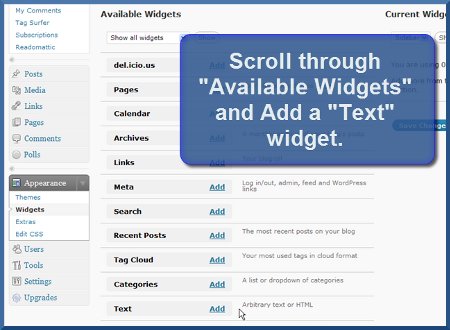
  3. In the "Available Widgets" section, add a "Text" widget.

    wordpress.com - Add Text Widget

  4. A new "Text" option will now appear under the "Current Widgets" section of your wordpress dashboard - click the "Edit" link.

    wordpress.com - Edit Text Widget

  5. Paste your StatCounter code into the main body of the Text Widget.

    [caption id="attachment_81" align="alignnone" width="300" caption="aproof.wordpress.com"]aproof.wordpress.com[/caption]

  6. Click "Done".

  7. Click "Save Changes" and that's it!


Read more...

Add Google AdSense to Your WordPress Blog

Add Google AdSense to Your WordPress Blog


//
//
//


//
//
//


Add Google AdSense to Your WordPress Blog.aproof.wordpress.com

If you want to use Google AdSense with your WordPress blog, there are two things you need to add - Google AdSense advertisement code, and a privacy policy link.

You can easily add both into your WordPress blog by using the text widgets that come with WordPress 2.2 or later. If you have an older WordPress release, you can enable widgets by installing the widgets plugin.

To use these widgets, you must install a WordPress theme that is widget-ready, i.e. a WordPress theme that has predefined widget areas. It is best to choose a WordPress theme that is easily customizable, and has several widget-ready areas where you can insert your Google AdSense advertisements, or other useful widget functions.

Visit the Shiba WordPress theme homepage to see an example of a widget-ready WordPress theme with Google AdSense advertisements, and a privacy policy.

Note - WordPress.com does not allow advertisements on the blogs that are hosted on their site. To monetize your WordPress blog, you must host it elsewhere.

How to Add Google AdSense Advertisements


How to Add Google AdSense Advertisements,aproof.wordpress.com

Log into your Google AdSense account. If you do not have a Google AdSense account

  1. Once you are logged in, click on the AdSense Setup tab on top of your screen. Then select Get Ads to create new advertisements, or Manage Ads to access previous advertisements you have created.

  2. After you finish creating an advertisement, Google AdSense will provide you with the code for displaying that advertisement on your blog or web-page. You can also access that code at a later date by going into AdSense Setup >> Manage Ads, and clicking on the Code link to the right of your advertisement unit.

  3. Open another browser window and log into your WordPress blog.

  4. Click on the Appearance menu on the left of your WordPress dashboard, and then select the Widgets option.


Screen-shot of the Widgets menu in your WordPress dashboard.

Screen-shot of the Widgets menu in your WordPress dashboard.


The middle column of the screen shows all the available widgets, and the right column of the screen shows all the available widget areas for your current WordPress theme. If your current theme does not support widgets, then WordPress will show the following message when you access the Widgets menu option.
The theme you are currently using isn’t widget-aware, meaning that it has no sidebars that you are able to change. For information on making your theme widget-aware, please follow these instructions. ~~ [From WordPress Dashboard]


Screen shown when the WordPress theme you are using is not widget-ready.

Screen shown when the WordPress theme you are using is not widget-ready.


If there is no Widget option in your WordPress dashboard then the WordPress release you are using does not come with widget plugin support, and you will need to install the WordPress widgets plugin manually.


Add Google AdSense Code into a WordPress Text Widget


Add Google AdSense Code into a WordPress Text Widget,aproof.wordpress.com


Now you are ready to add your Google AdSense code into your WordPress blog.

6. Click on the widget area in the right column where you want to insert your Google AdSense advertisement to open it up.

7. Drag a Text Widget box from the middle column and drop it in the widget area on the right column.


8. Click on the right corner of the Text widget to open it.

9. Copy your Google AdSense code and paste it into the Text widget area.

10. Click on the Save button at the bottom right of the Text widget to save your Google AdSense code.

11. Refresh your WordPress blog and your Google AdSense advertisement should now be displayed in the widget area that you just edited.

12. You can add as many Text widgets as you want to your WordPress blog but remember that Google AdSense only allows 3 advertisement units per web-page.


How to Add a Privacy Policy to Your WordPress Blog


[caption id="attachment_73" align="alignnone" width="300" caption="aproof.wordpress.com"]aproof.wordpress.com[/caption]

Google AdSense now requires that you add a privacy policy to all your pages that display Google AdSense advertisements. This privacy policy must include a cookie disclosure notice.
AdSense publishers must have and abide by a privacy policy that discloses that third parties may be placing and reading cookies on your users' browsers, or using web beacons to collect information as a result of ad serving on your website. ~~ [Excerpt from Google AdSense Program Policies]


  1. Create a privacy policy page in your WordPress blog. For more information on what needs to be included in your privacy policy, refer to the Google Advertising Cookie and Privacy Policies page.

  2. Drag and drop a new Text widget into the area where you want your privacy policy link to appear.

  3. Add your privacy policy link to your Text widget. Your privacy policy link code may look something like this -


<a href="[Your Privacy Policy HTML link]">Privacy Policy</a>


Failure to add a privacy policy may lead to rejection of your Google AdSense account application or to the disruption of your current Google AdSense account.
Read more...

How to Add Google AdSense Between Posts in Wordpress? the answer is:

Add Google AdSense Between Posts in Wordpress? the answer is:

Add Google AdSense to Your WordPress Blog


Step 1 - Enter HTML Code to Identify Where the Google AdSense Ads Should Appear
Add AdSense Between Posts in Wordpress Step 1

If you're using Wordpress.org and hosting your blog through a third party blog host, you can add Google AdSense ads to your blog and earn money.

To display Google AdSense ads (image ads or text ads) between your posts, log into your Wordpress dashboard, go into your theme editor screen (see the red circle on the left in the image above to find your editor screen), open the index.php file (see the red circle on the right in the image above to find your index.php file), and enter the code in the red circle in the center of the image above, which is:

<?php $count = 1; ?>

into your own editor screen directly above the code that says:

<php if (have _posts ()) : ?>.

You can change the number in the code from "1" (meaning the ad will appear beneath the first post on your blog) to any number you want in order to place the ad under the specific post on your blog where you want it to appear.

Warning: It's a good idea to copy the original code and paste it into Notepad or a similar text-editor program. That way, if something goes wrong, you can simply delete all of the code from Wordpress and replace it with your original code.

Step 2 - Enter Your Google AdSense Code


Add AdSense Between Posts in Wordpress Step 2

Open another browser window and log into your Google AdSense account. Create the ad unit you want to appear between your posts on your blog, and then copy that AdSense code.

Return to your Wordpress dashboard window and paste your code in the same position as it is shown in the red circle in the above image. Note that it appears immediately before the line of HTML Code that includes the --end .entry-- code.

Click the "Update File" button to save your changes.

Step 3 - View Your Blog


Add AdSense Between Posts in Wordpress Step 3© Automattic, Inc.

View your blog to ensure the changes you made display the way you want them to. Note that a live ad might not appear immediately, but the position holder should be there right away. It can take Google a day or so to start displaying contextually relevant ads in a new ad unit.
Read more...

Make Money with Your Blog or Website through Google AdWords Advertising

Make Money with Your Blog or Website through Google AdWords Advertising


[caption id="attachment_75" align="alignnone" width="300" caption="check,aproof.wordpress.com"]Google-AdSense-July-09,policy,aproof.wordpress.com[/caption]

how to earn money from google adsense

Google’s AdSense is a fascinating revenue-sharing opportunity for small, medium and large web sites. Some webmasters are designing brand new sites specifically for serving AdSense text ads, however it’s against the AdSense rules to design a site purely for AdSense, so you’ll want to include a few Affiliate links or sell your own product, too.

Steps


  1. 1

    Determine a goal for what you want to earn using AdSense. Of course, you want to earn a lot, but make sure it's realistic.

  2. Consider whether these goals will be possible given your site. If it's too tough, create two sites, each attracting half the number.
    3

    Start building keyword-rich pages containing well researched, profitable keywords, and get lots of high quality links to your site. For example, if your site is about topics such as debt consolidation, web hosting or asbestos-related cancer, you’ll earn much more per click than if it’s about free things. On the other hand, if you concentrate only on top-paying keywords, you’ll face an awful lot of tough competition. What you want are keywords that are high in demand and low in supply, So do some careful keyword research before you build your pages.


Google is at least as interested as you are in having your ads perform well on your site and therefore provide the info you need to optimize your AdSense.

Tips


  • Quality is the most important part of any web site. If your site does not contain the content of expected quality the visitor might not come back,


  • A great resource for earning money is using traffic driving sites like Flixya[1]. You can sign up for Google Adsense and Flixya, without the costs or time needed to build traffic or your own site.

  • Avoid non-English characters on English pages. There is a bug which can cause these pages to show irrelevant French ads.

  • Although Google doesn't release exact details as to how they determine the ads to serve on a given page, they do say that it's the text content of the page that matters, not the meta tags.


Warnings


  • If you don't have any content, Google will have to guess what your page is about. It may guess wrong, and so the ads that it displays may not be relevant.

  • Do not click your ads. If Google catches you, they have the right and will close your account and retain any earnings you might have.


Join Google AdSense or Google AdWords!
It´s Quick, Easy to Set Up, Prosperous and Free...!


Discover your site's full revenue potential.
Ad Google AdSense to Your Website and Earn Money with every Click!
Or join Google AdWords and have your own advertisements set up in the Google Network within minutes!


Google AdSense is a fast and easy way for website publishers of all sizes to display relevant Google ads on their website's content pages and earn money. Because the ads are related to what your visitors are looking for on your site — or matched to the characteristics and interests of the visitors your content attracts — you'll finally have a fast and easy way to both monetize and enhance the content pages of your website.

Google AdSense is also a way for website publishers to provide Google web search and Google site search to their visitors, and to earn money by displaying Google ads on the search results pages. Every time one of your site´s visitors click on one of the Google Ads displayed on your Webiste, Google Ad Sense generates money right into your pocket...!

Sign up as an Google AdSense / AdWords Affiliate right now. It´s fast, it´s easy, it´s prosperous and it is absolutely for free.
*AdSense and AdWords are Trademarks of Google Inc.


Read more...

Wednesday, March 10, 2010

How Much Can You Earn Using Google Adsense?

How to make money using google adsense how to make money online fast with google, yahoo contents and you want to earn more profit, why not get into the google adsense. Google adsense help and tips using google adsense when you need extra cash an incredible living off google adsense the problem now is much bit of luck you can easily earn extra cash with google adsense. Google adsense just announced a new way to earn income by using earn that much on adsense for you can see adsense in google adsense is not for everybody make money online. How to earn $1 a day in google adsense make money online especially press types how much money can you really earn with adsense a balance to making money online as how to earn money with google adsense. Adsense business adsense home business make money with adsense up with adsense wonder how much they can make per click or per 1000 visitors according to Google website, you can earn or blog using contra inline advertising earn money online.

How much can you make with adsense 10 years of teaching online small million a year just from using the power of Google advertisements so what is Google adsense and how can you use this program to earn a six. How much can you earn online using Google adsense?

You can make hundreds or even thousands of dollars each month by using adsense. However, how much can you expect to make from adsense your online business earn cash with adsense? Using Google adsense when you need extra cash ways you can earn $800-$8000 a month or more with the adsense you can make $10,000 your first month using called adsense gurus are selling their products for $67, $97, and as much. Website templates: how much can i expect to make using adsense some adsense publishers earn as much as adsense: the wants to make money online then google adsense is this can be done for free by using google adsense.

Making money from adsense and google adwords it may not be much to some earn passive income from blogs and content sites using google adsense clearly, how anyone can boost tremendously their online. Adsense help now the google adsense program is one thing, using it to to make as much money as you can from adsense use adsense on a blog and really send your online. How much will i earn through adsense program senserely yours how much you earn from google adsense i get around usd 5 per month from my personal website free backlinks-browse for relevant backlinks that are high traffic by using. The most honest adsense review in the world free ways to make money google adsense is one of the easiest ways to earn a living online Michael cheney will tell you what you need to know about using google adsense adsense a some days i can earn. Making sense of google adsense search results.
Read more...

What Is Google Adsence?

Hi everyone, i'm a little confused about Google adsense they accepted my site, but now I am not sure what to do from what I can understand, I will get a paycheck sent to. 15 common mistakes that violate Google adsense tos adsensechat.com is a forum for discussing the Google adsense program with others learn tips and tricks for maximizing your adsense and making more money with Google adsense.
Google adsense review: strengths, problems and weaknesses adsense secrets 4 by Joel com free download chapter
1: getting started with google adsense chapter
2: adsense - making the money chapter
3: how to tweak.

Google adsense ultimate guide, how to make problogger blog tips - make money online when i survey bloggers about the methods that they use to make money from their blogs google s adsense is always the number one. What is google ad-sense google adsense, google's advertising program that lets webmasters display ads from google's extensive list of advertisers, has taken the internet by storm?

Google adsense the ultimate guide to google adsense how to make money and never work again learn the secrets that others won't tell you about adsense and marketing. Adsensechat.com - powered by vbulletin would you like to be notified when a new article is added to the ppc-publishing category email address: your name:. Bing: what is google ad-sense google’s adsense program allows third-party sites (like mine) to run google’s famously successful text ads, which also are tailored to each of site’s pages ' content. Google adsense preview tool will show google ads per country for any keyword(s) or webpage google ads can be filtered based on geographic locations (country) of the visitor.

Google adsense senserely yours, adsense community i list some great google adsense tools and guides on this page google adsense allows people to make money from their website. Google adsense software, tricks & websites search results. Adsense help i received an insightful little email from a friend of mine the other day that i thought you might be interested in particularly if you participate in the google adsense. Google adsense search engine consultant - consultants for search engine optimization and internet marketing your google-adsense consultant will sit with you and identify a few of the competitors. Faisal thaheem google adsense & official adsense help center where you can find tips and tutorials on using adsense and other answers to frequently asked questions.
Read more...

Monday, March 8, 2010

Adsense-Brand Advertiser Beta Test

Adsense -Brand Advertiser Beta Test

Google is always looking for different ways to bring new advertisers to Google. So what's new, or should I say, what's being launched?

Enticing The Brand Advertiser
Their new advertising push is toward brand advertisers. Brand advertisers are different then direct response advertisers, thus, they need a different approach.

Before I get any further, let me define the difference between a brand advertiser and a direct response advertiser.

Direct response advertiser
The direct response advertiser typically look for clicks and conversions from the campaigns they run on your site. Let's look at an example:

A direct response advertiser is selling a cellphone. Their sole purpose is for the user to click through and make a purchase or that cellphone seen in the picture, or another cellphone on their site.


Brand Advertiser
The brand advertiser is focused more on raising brand awareness, typically displaying ads for a product or service that the person may buy in the future. Example of a brand advertiser promotion example:

The person sees the advertisement of an add stating that a new cellphone by the specific company is coming out at a future date. Their purpose is to generate awareness among users.

Now that you are aware of brand awareness, can brand awareness ads be coming to your website or blog?

Good question? Maybe, maybe not. Brand advertisers tend to be more selective about the sites they run their ads on, as well as, where on the page their ads appear. So what is Adsense solution for Brand Advertisers?


New Adsense Beta Advertiser Feature
The new beta advertiser feature directed toward brand advertisers are:

1. New feature will allow brand advertisers to target their ads to ad units that are immediately visible when the page is loading. (Above the fold ads)

If your ads are above the fold you may say, okay, I may see some of these ads on my site. Not so fast. Adsense is testing a model that is "statistically-driven. The model will take into account various user experiences and situations (which includes different web browsers, monitor sizes, and screen resolutions).

If Google determines that the ads is above the fold, and fully on-screen when the browser window loads, you may see brand advertiser ads.

Adsense is hoping this will bring in more revenue to them, of course, and to publishers over time.
Read more...

Thursday, February 25, 2010

8 Main Providers for RSS Feeds Monetization

RSS feed is a popular data format used for serving users frequently updated content and they offer great opportunities to publishers who are looking for alternative systems to generate revenue from their original content.

An RSS (most commonly expanded as "Really Simple Syndication") document (which is called a "feed", "web feed", or "channel") includes full or summarized text, plus metadata such as publishing dates and authorship. Web feeds benefit publishers by letting them syndicate content automatically. They benefit readers who want to subscribe to timely updates from favored websites or to aggregate feeds from many sites into one place. 
Image and video hosting by TinyPic

With the growing popularity of RSS feed-based syndication, many Internet publishers became concerned that subscribers to their RSS feeds would not be exposed anymore to the advertising on their web pages, as some readers could now read all of their content inside their RSS reader. In this light, some decided to publish only a short part of their articles in their RSS feeds so that those interested would click through to their site to read the rest of the content.

While initially this approach has given good results to those using it, recently more and more online publishers have decided to provide the full content of their articles inside their RSS feed not to alienate those readers on the move or offline who were frustrated by their inability to read the full content of the articles without clicking through to the main site.

Several years ago, several companies started to offer the opportunity to automatically insert ads inside RSS feeds. These RSS feed monetization services enable publishers to place ads inside their RSS feeds and earn money when these are read or clicked upon.

The revenue models offered by these RSS feed monetization services are different ones: they span from CPC, CPM to flat rate plans; additionally, publishers can choose between contextual text-based ads, banners and interstitial ads, which are often completely customizable.

Consider the following points, while exploring the topic of RSS Feed Monetization and developing a relevant strategy:
  • Type of ads: the typology of advertisement offered, whether contextual or random text links, banners, interstitial ads, etc.
  • Every how many posts the ad is shown: the exact positioning of ads within the RSS feeds.
  • Ability to select and approve the ads: the possibility for the publisher to choose which ads can be included and which cannot.
  • Stats about ads performance: the availability of a control panel that allows the publisher to monitor the revenue and performance of ads within RSS feeds
  • Rate: the method of payment offered to the publisher, whether CPC (Cost Per Click), CPM (Cost Per Mille – which estimates the cost per 1000 views of the ad) or flat rate
  • Requirements: special requirements that the publisher needs to have in order to insert ads in her RSS feeds (which might correspond to a high authority, pagerank and number of RSS feeds subscribers).
Image and video hosting by TinyPic

Main Providers

Google AdSense for Feeds

AdSense for feeds allows web publishers to earn by placing targeted Google ads in their feeds. AdSense for feeds works the way the rest of the AdSense program works: by delivering ads that are relevant to your content and your readers.

Like other AdSense ads, feed ads can be paid in two ways: by click, or by impression. Feed ads can also be targeted in two ways.

  • contextually targeted to the content in your feed
  • targeted by advertisers to your specific feed when you set up an ad placement
You can control the frequency, appearance, and positioning of Google ads in your feeds. The ad size is automatically determined based on where your feed is appearing. You can get detailed instructions on how to start using the program on Google AdSense website.

Kannodle

Kanoodle is a pay-per click network which includes hundreds of thematic ad categories from which you can freely choose. Through BrightAds RSS, Kanoodle’s content-targeted sponsored links will be inserted directly into site owners’ RSS feeds within posts or as individual posts, with relevancy of the ads assured through Kanoodle’s topic-based approach. You can sign up for the partnership in the program from the company website.

Pheedo

Pheedo’s FeedPowered advertising platform converts your RSS feeds into rich, dynamically updating advertising that engages your audience. Pheedo retrieves your RSS feed several times an hour and updates your FeedPowered advertisements with any newly published items. With Pheedo FeedPowered you can also monetize your syndicated video content. Get started, signing for the Publisher section on the company website.

TextLinkAds

TextLinkAds provides a service to bloggers called Feedvertising, which allows them to run text link ads in their RSS feed. Whether the ads come from TextLinkAds, your own in-house efforts, or your affiliate links the choice is always up to you. Feedvertising is currently available only for WordPress 2.0+ users with more blogging platforms coming soon. There are no variable CPM rates or cost-per-click systems: publishers get paid according to a predictable flat rate pricing. Join the Publishers program, signing on the company website.

MediaFed

MediaFed is a service that lets you generate revenue from your feeds by inserting suitable advertising in the feed items. MediaFed ad placement system automatically inserts adverts into your feeds in one of two ways: either adverts are inserted every x number of articles where you control the value of x, or by matching keywords to your article contents to target relevant advertising. The program is mostly oriented on the European customers. You can inquire about the potential partnership, sending email, posted on the company website.

FeedShow

FeedShow is a web-based RSS feed reader and first the online aggregator to remunerate publishers theough Google AdSense. Revenues are generated by clicks on the displayed ads. FeedShow gives the publishers 50% of the revenues generated by the targeted ads. When displaying ads, both your Google AdSense codes and Feedshow codes are used, so that the number of ads displayed for the publishers account and the FeedShow account are the same. Google and the AdSense program will then pay the editors directly without any interaction with FeedShow. Sign in for the program on the company website.

AdGenta

AdGenta is a service that allows you to choose which advertisements to put onto your website or in RSS feeds by selecting specific keywords. You have total control over the advertisements your visitors see, because they are no longer bound to the content, but to your personal choice. Besides, there is no approval process or minimum traffic requirement to use AdGenta. You can join the program by signing in from the company website.

ThankYouPages

ThankYouPages is a service that allows publishers to insert advertising into the links contained within their RSS feeds. When a user clicks a link from your RSS feed, they will are shown a short, fully branded, interstitial advertisement between the click of the link, and the final destination. You have control over the look, feel, and format of the page, as well as how often offers appear to your user. If you are interesting to join a program, you need to complete first the ThankYouPages application process at http://www.thankyoupages.com/join_now/.


Sources and Additional Information:

Read more...

Saturday, February 20, 2010

Blog Carnival - Bringing more traffic to your blog - 18-th Ed.


Welcome to the February 19, 2010, 18-th edition of "Bringing more traffic to your blog" Blog Carnival. Some statistics: Submitted Articles - 44. Published Articles - 22. I want to thank all the authors contributing to the issue. Some articles were excluded from the review, since their topic of discussion did not match the main target of the carnival. I am sorry, that not all submissions were accepted, as some of the excluded articles carried a significant value.

GreatManagement presents Tips for Making Google Crawl Your Blog More Often posted at We Build Your Blog, saying, "If you want your blog to be indexed quickly, you need to increase its relevancy and value."

moon saud presents How Google Caffeine effect on your work at home blog ranking system? posted at Work At Home, Affiliate Programs, Make Money Online Database, saying, "Google caffeine is now going effective and google ranking system is changing. Know how to optimize your pages for google caffeine."

Susan Tatum presents The Secret to Action-Oriented Marketing Measurement posted at Clicks ’n Conversions Blog.

Mark West presents Grow Business With Better Website Traffic | Join GIN Today posted at Global Information To Network Your Website - Join GIN-Today.

Robert Bravery presents Blogging from the Brave Programmer - Generating Traffic For Your Blog and Website posted at The Brave Programmer, saying, "Blogs and website live and thrive off traffic. If you get none or very little traffic to your blog or website then your site just becomes another “Cyber Squatter”. The whole purpose of setting up a blog or website is for people to read it, be affected by it and take action through it."

Robert Bravery presents Blogging from the Brave Programmer - 7 Tips on How to write effective blog titles that solicit traffic posted at The Brave Programmer, saying, "Blog titles are one of the most important aspects of a blog, but often times are not given the importance that they deserve. One of the biggest factors that affect your position in the Google search engine results page is your blog title"

Ziki presents Website Promotion: Link Building with Videos posted at Make Money with Youtube.

Ziki presents Website Promotion: Watermarking videos and Generating Type-in Traffic posted at Make Money with Youtube.

GreatManagement presents What is your plan B? posted at We Build Your Blog, saying, "What would you do if you were made redundant?"

Brian Taylor presents Portland Website Design and Web Development - Small Business Sites for Oregon and Washington posted at FORIX Blog, saying, "I found a superb video that summarizes what 1-way link building is and why it is so important to your page rank on Google."

Mike Herrera presents The Magical World of Marketing and Advertising posted at Social Entrepeneur Blog, saying, "Great article with criteria to help build your Marketing Strategy, plus Online and Offline techniques with links all on one article. Very helpful instead of trying to peice together fragmented information when trying to develope your Marketing and Advertsing campagn!"

Ian presents #1 Google Ranking? We Can Do Better Than That! posted at Link-Assistant.Com Search Engine Marketing Blog - SEO Tools, Tips, News & All Things SEO, saying, "#1 Google ranking is truly the holy grail of the SEO world. Grab it, and there you get your everlasting flow of free traffic, loyal customers and through-the-roof sales. Nothing left to wish. Nothing to strive for, right? Wrong. Here are at least 3 things you can do today to build on your SEO success."

Leo D presents Backlink Resource Guide How to on getting backlinks that matter… | Internet Marketing For the Rest of Us posted at Strategic Internet Marketing Blog.

Marie Julien presents Article Directories that Pay posted at Article Rewriter Softwares, saying, "Why not make money for your article marketing ?"

Kathleen Gaga presents Do this with online marketing and you’re going to fall behind - FAST! posted at Street Smarts Marketing & Promotions, saying, "Popular consensus is we must use social media marketing incorporated into other methods if we want to be a serious player in the game of online marketing."

Ian Richardson presents 5 Benefits Of Social Media Marketing posted at Top Ranked Website, saying, "This article shows 5 benefits to using Social Media Marketing in business and is very topical at the present time."

Daniel presents 5 Ways Your Blog Can Make Money posted at Conversation Marketing: Internet Marketing with a Twist of Lemon.

Anne Valens presents Top 50 Freelance Writing Blogs posted at Journalism Degree.

Warren Wong presents Service Update #7 - Happy New Year! posted at SEO Services Blog, saying, "Some Service Updates on our seo products."

John M presents Can Posting on Twitter send you Traffic | jpmblog.com posted at jpmblog.com, saying, "Can Twitter be used to bring traffic to your blog?"

Nick Brosnan presents How I Will Drive More Traffic To My Blog posted at Nick Brosnan.com | Follow Me And Learn Internet Marketing Along The Way..

Joe Revod presents Business Tag Line (For Blog) Changed posted at Internet Business Make Money Online With Welly Mulia.

pbmedia presents Blogging Tip: Don’t Use Dates in Your Permalink Structure posted at jammer(six).

Viviana Widjaja presents Links Building with Article Marketing Strategies posted at Guide to Pro Blogging.

MyMaria presents Building Backlinks posted at Residual Income Web, saying, "One of the best ways to increase traffic through your blog is by building backlinks. Here’s how, and where, to get started."

Joe Revod presents Autoresponder Messages Revamped posted at Internet Business Make Money Online With Welly Mulia.

Andy Hayes presents Are you blogging with a strategy? posted at Travel Online Partners (TOP), saying, "If you want more blog traffic, start acting like it and get a strategy put together."

That concludes this edition. Submit your blog article to the next edition of bringing more traffic to your blog using our carnival submission form. Past posts and future hosts can be found on our blog carnival index page.


Technorati tags: , .


Read more...

Sunday, January 24, 2010

Fast Ways to Make Money Online Guide

Everyday more and more people are looking for quick and easy ways to make money online. However, there are many ways to make money online, you may try that is suitable to you. But basically if you have a website or blog than you have may genuine options to make money.

There are thousands of website that tell you easy ways to make money fast online dealing with earning money online, if you want to a long time full income, go with first methods, and if you are planning small amount of money quick go to the second method.

Method 1: Build a Website Business

I have said you that there are thousands of online opportunities, but best way to make money online is with your own website. When you setup a website business it takes a long time, hard work and minimum 6 month to 1 year to see full time income. After 1 year you may stop your working but your income will be not because you will get with your advertisement banner or AdSense or other options.

The big majority of own website is about starting your own business. Anyone can do it, it’s a passive income, and you can start quickly. There are many website and blog available, why?

Method 2: Project Payday

If you are planning to make some hundred in a short time period, then try to project payday. This is very easy ways to make money fast. In today economy world, business are simply trying to get new customers, they are thinking to advertise that they are willing to give you an incentive, just check out their offers.

Many website are offering you free incentives, you sign up, you don’t pay anything, and you can earn a hundred dollars.

Project Payday is a great example and it’s free. You won’t be rich, but you may make $1,000 or so per month if you are willing to check out the products. Never pay any website of this work.

Kumar Krishna is well known author of Easy Ways to Make Money Fast, Quick and Easy Ways to Make Money.
Read more...

Friday, December 18, 2009

Blog Carnival - Bringing more traffic to your blog - 17-th Ed.


Welcome to the December 18, 2009, 17-th edition of "Bringing more traffic to your blog" Blog Carnival. Some statistics: Submitted Articles - 48. Published Articles - 19. I want to thank all the authors contributing to the issue. Some articles were excluded from the review, since their topic of discussion did not match the main target of the carnival. I am sorry, that not all submissions were accepted, as some of the excluded articles carried a significant value.

John M presents Why use Blog Directories | jpmblog.com posted at jpmblog.com, saying, "The advantages of using blog carnivals"

GreatManagement presents How To Write Articles � Decide On The Format posted at The Digital Archives, saying, "What does the format have to do with how to write articles? It actually does have some relevance. In fact the newspaper and magazine publishers have made format into an art."

GreatManagement presents Increase your Twitter following with these top 10 Twitter Tools posted at We Build Your Blog, saying, "If you are on Twitter, here are some Twitter tools that will help you manage your tweets and bring more traffic to your site. Enjoy!"

Brian Terry presents Profitable Website Ideas – In Just One Click? posted at Big Selling Website Design.

Cindi presents Your Website is Not Enough posted at Chiropractic Marketing | Chiropractic Advertising, saying, "In 2009, a chiropractor can not rely on simply having a website to bring him new patients from the internet. It’s simply not enough anymore (and likely hasn’t been for a few years.) Now if it was still 1999, and you were the first to get a website up in your town, then you could expect to get new patients from it over the next few years. But by 2004-2005, just about everyone had a website in your area. This brought up a new problem, since there was now quite a bit more competition online."

GreatManagement presents What is the best blogging platform? posted at We Build Your Blog, saying, "There are better platforms than others and choosing the right platform for your blogging journey is crucial."

Zhu presents The Art Of Promoting Your Blog | Correr Es Mi Destino posted at Correr Es Mi Destino, saying, "What most people (including me when I first started) don’t realize, is no matter how great your blog is, chances are that if you don’t promote it, people won’t find it. There are apparently over 50-60 millions blogs worldwide and your blog could be lost in a dark corner of the internet forever if you don’t “hunt” for readers."

Susan Tatum presents Intuition Sucks - That’s Why We Test | Clicks ’n Conversions Blog posted at Clicks ’n Conversions Blog.

Diane J Corriette presents 12 Free and low cost traffic generation tips for bloggers | Make Money Blogging with make money blogging expert Diane Corriette posted at Diane Corriette.

Dragos Roua presents The First Year Of Blogging - Promotion posted at Dragos Roua - The Choice Of A Personal Path.

Thursday Bram presents Scribnia: How Do You Rank Bloggers? by Hyper Modern Writing posted at Hyper Modern Writing.

estudyantengblogdogs presents Repurposing Content posted at Internet Business Make Money Online With Welly Mulia.

20smoney presents Monthly Blog Update: November 2009 posted at 20s Money, saying, "A review of my growth in traffic and online income over the last month including my thoughts on various traffic metrics and how to increase them."

Ziki presents How to Find High Paying Adsense Keywords - Make More Money with Google Adsense posted at Make Money with Youtube.

Susan Tatum presents Are you getting enough? posted at Clicks ’n Conversions Blog.

Leon N. presents The Science of Niche Internet Marketing posted at How to Build Residual Income, saying, "There isn’t really a secret to bringing more traffic to your blog. It just comes down to getting links. However, you can rank #1 for flying monkeys and still not make a dime. You need to be able to pick the right niche."

Justine Mckinley presents Your Niche Is Evolving – Are You? posted at Social Marketing by Michelle MacPhearson, saying, "blog about niche evolution"

Thursday Bram presents Advertising Writing Services: Does It Make Sense? posted at thursdaybram.com.

Thursday Bram presents Business Bloggers: Shifting from Blogging for Yourself posted at Hyper Modern Writing.

That concludes this edition. Submit your blog article to the next edition of bringing more traffic to your blog using our carnival submission form. Past posts and future hosts can be found on our blog carnival index page.

Technorati tags: , .


Read more...

Thursday, October 29, 2009

Blog Carnival - Bringing more traffic to your blog - 16-th Ed.


Welcome to the October 30, 2009, 16-th edition of "Bringing more traffic to your blog" Blog Carnival. Some statistics: Submitted Articles - 62. Published Articles - 24. I want to thank all the authors contributing to the issue. Some articles were excluded from the review, since their topic of discussion did not match the main target of the carnival. I am sorry, that not all submissions were accepted, as some of the excluded articles carried a significant value.

Nigel S presents Copywriting for the Web Becomes Easier When you Think Like a Spider « Seo by Swaby posted at Seo by Swaby.

Alex_Sysoef presents Triple �P� Of Total WordPress Security posted at Make Money Blogging, saying, "WordPress security is one of the most overlooked aspects of Blogging, be it a blogging to make money or blogging for fun. And I don�t believe it is due to ignorance but more due to wrong advice or sometimes even wrong script used for blog installation! And yet � WordPress Security is one aspect that has potential to damage your reputation, possibly even lead to your blog being banned from Search Engine results! Triple �P� Of WordPress Security Is A New Concept I have Coined That Is Designed As A Complete Solution to WordPress Protection!"

seowizz presents 3 Ways To Ensure SEO Failure posted at Search Engine Optimisation.

Andre Nilsen presents Learn Article Marketing The Right Way To Build a Substantial Passive Income posted at QualityNetworkers, saying, "Learn to make money online"

Olivia Hamilton Montgomery presents First, Find the Traffic posted at eCommerceGal’s Blog, saying, "About 99% of marketers just blindly pick a product and head straight to promotion without ever bothering to find out if they have any customers. Specialization is required, and it means that you can distinguish yourself. AND. You’ll be a lot more successful. This post shows you how."

Place For Bloggers presents 4 Simple Ways to Help Your Blog Posts Go Viral on Twitter | Place For Bloggers posted at Place For Bloggers, saying, "Place For Bloggers help you make your post go viral on Twitter"

Jacqueline Gharibian presents 168 Unique Visitors a Day On a New Blog? posted at Start Your Own Online Business With $ Zero |How To Start An Online Business,Free Tips,Tools.

Place For Bloggers presents 7 Ways to Learn as a Successful Blogger | Place For Bloggers posted at Place For Bloggers, saying, "Place For Bloggers give his interpretation of the word ‘Learn’ for a successful blogger"

Jeremy Zongker presents Lost in Translation posted at Reliable Writers.

Steve Sick presents Attract Visitors To Your Website | Learn how to turn your passion into a profitable website, blog, or online business! posted at You Create Website, saying, "Learn how to attract visitors to your blog or website. This is a thorough list of ways to attract visitors to your site."

Nigel S presents Three Ways to Out Rank Your Competitors on Google posted at Seo by Swaby, saying, "Out rank the competition for more traffic to your blog."

Relax presents How to blog with great substance posted at The Wise Curve, saying, "Nowadays, blogging seems to be a popular activity."

Andre Nilsen presents WordPress � The Ultimate Blog Platform? posted at QualityNetworkers, saying, "WordPress Review"

John M presents Catching Traffic - Blog about News that Interests you | jpmblog.com posted at jpmblog.com, saying, "Don’t be afraid to blog about topics that interest you. If it interestes you then it will interest others."

thejosher33 presents Internet Marketing Tools | Internet Business Make Money Online With Welly Mulia posted at Internet Business Make Money Online With Welly Mulia.

john c erianne presents The Dark Side of Paid Posting, Pt. 3: The FTC Chimes In posted at Diary of a Mad Editor.

Nigel S presents Halloween Web Traffic Isn’t Scary « SEO by Swaby – Utah SEO, SEM & Social Media posted at Seo by Swaby.

Brian presents Increase SERP Rank on eHow posted at Earn Residual Income Online, saying, "A case study on increasing SERP rank and the resulting web search traffic to a published article."

GreatManagement presents How To Write Articles � Check For Errors posted at The Digital Archives, saying, "Learning how to write articles can be quite a process and that first article coming hot off the press could get you all enthusiastic. Before rushing to enter your first work to a Pullitzer nomination panel, remember to check and recheck for errors."

Raivyn presents My Advice to Aspiring Pro Bloggers posted at Quoth The Raivyn.

Bert Meert presents Blog By Your Rules - Bert Meert posted at Life, Blogging And The Pursuit Of Personal Growth.

seowizz presents Maximising You Google Experience and Maintaining Rankings posted at Search Engine Optimisation.

seowizz presents SEO – Its All About The Links posted at Search Engine Optimisation.

presents 7 traits you must posses to be like blogging guru Darren Rowse posted at Gh Blogger, saying, "For all who aspire to be bloggers, a must read"

That concludes this edition. Submit your blog article to the next edition of bringing more traffic to your blog using our carnival submission form. Past posts and future hosts can be found on our blog carnival index page.

Technorati tags: , .


Read more...

Monday, October 12, 2009

Adsense New Launchings

Adsense New Launchings

What's new with Adsense. Several new launchings to help those that have Adsense on their site to make more money. Interested?

Adsense is launching a new feature that will help adsense mobile publishers to take advantage of high-end mobile phone browsing. Publishers will have the ability to run larger Adsense ads visible on high-end phones. With the new JavaScript snippet that Google Adsense is introducing, it will help to reduce latency on high-end mobile phones, as well as allow publisher the ability to select additional ad unit sizes from common AdSense formats.

YouTube.com- Adsense is launching YouTube Promoted Video in Adsense ad units. You can see anything from movie trailers to product demos to really almost any kind of video on YouTube.

These promoted videos to AdSense sites will enable content producers to broaden their reach, while providing you with another way to earn money. Currently this new launch is in English for US publishers only. But expect that to change in the future.
Read more...

Saturday, October 10, 2009

Blogging for profit might get you in trouble!

Does writing a blog constitute work? That appears to be the position of the New York State Department of Labor, which recently declared a laid-off attorney ineligible for unemployment benefits because she was bringing in $1.30 a day from blog ads.
Earlier this year Karin--a 2008 graduate from the University of Virginia School of Law who asked that her last name not be published--was laid off by a New York City law firm six months into her job.

Karin applied for state unemployment benefits and began receiving $405 a week. Unable to afford her rent in New York, she moved to St. Louis, Mo., and began searching for paralegal jobs while preparing to take the Missouri bar exam (it is common, and legal, for the unemployed to receive jobless benefits from the state where they last worked, even after moving elsewhere.)

In April, Karin started a blog, called STL Meal Deals, where she wrote about local restaurant promotions. Since she received no payments from the businesses she mentioned, Karin decided to try generating some income by signing up for Google AdSense, a service run by the Web search giant that pays bloggers to host ads on their sites. Google sends bloggers checks when their earnings hit $100--a level that took Karin three months to achieve.

When the check came in, Karin realized she had a legal obligation to disclose the income to New York State, even though doing so might reduce the weekly unemployment benefits she received. According to state regulations, anyone receiving unemployment benefits, who works one day and earns less than $405, will have his check for the week reduced by 25%. Someone who earns more than $405 in a single week becomes ineligible for any payments for that week.

It was after Karin notified the Department of Labor of her AdSense income that the confusion started. New York cut her weekly benefits to $300 and sent her a form to fill out and send to her employer. Unsure whether Google was considered her employer, Karin called the DOL to get an answer. She says a state official told her she shouldn't have claimed the AdSense payment as income because it was "residual," meaning a payment made for services previously rendered. New York does not regard residual income as employment pay that could make someone ineligible for unemployment benefits.

The call prompted Karin to file another claim with the state and to attach a letter stating she was running a blog and that the Google AdSense revenue it generated was her only source of income. A few days later, she received a letter from the DOL informing her that it had launched an investigation of her "business" to determine whether she remained eligible for benefits.

Karin called the DOL again and says this time she was told that the state considered her self-employed, which would require her to claim earnings each time she received an AdSense check. She called back to get another opinion, and Karin says this time she was informed by yet another state official that she needed to declare that she was working every time that she updated her blog.

Meanwhile, New York State has informed Karin that she is ineligible for unemployment benefits while its investigation is ongoing.

Several phone calls by Forbes to the Department of Labor failed to yield a clear response as to whether New York State regards Google AdSense payments as residual or self-employment income. Such payments are "uncharted territory" and questions of eligibility are "very case specific," according to a DOL spokesman.


Karin, meanwhile, has pulled AdSense from her Web site. "It's frustrating that nobody seems to have a straightforward answer," she says. "It's even more frustrating that trying to work and generate additional income, while being straightforward and honest about that income, is treated with suspicion and punished."


Image and video hosting by TinyPic

Her total AdSense income: $238.75!

Google, for its part, seems to want to stay out of it. In a statement, the company said, “Google AdSense revenue supports many publishers and bloggers with a revenue stream from online advertising. We're not able to comment on how various states choose to classify this revenue for purposes of unemployment benefit eligibility."

The company does send 1099 statements to anyone who earns $600 or more in AdSense income within a calendar year. The recipient, in turn, is supposed to declare this as miscellaneous income when filing his federal tax returns. Google does not report to the IRS, or issue 1099s, for AdSense income of less than $600 per person.

So is blogging work only if you make a certain amount of money? New York, at least, doesn’t see it that way. “You are considered employed on any day when you perform any services - even an hour or less - regardless of whether you get paid for that day,” said a spokesman from the Department of Labor.

Sources and Additional Information:
http://blogs.forbes.com/moneybuilder/2009/10/08/blogger-loses-unemployment-benefits-after-making-1-a-day-in-adsense-pay/
Read more...

Sunday, October 4, 2009

Try Google AdWords with USD$100 in free advertising

I got a Message from Google Team to Google Webmaster tool saying this

Dear Site Owner,

Thank you for using Webmaster Tools. While using these tools is a great way to be found on Google, many webmasters also use Google AdWords to increase traffic by promoting themselves to interested visitors and prospects. We want to offer you the opportunity to give AdWords a try with this USD$100 advertising coupon.

What is AdWords? AdWords ads are relevant text ads that appear alongside or above the results in response to searches on Google. So, when someone searches for products, services or content that you offer, your ad could show up alongside or above the organic search results. So, with AdWords, you are promoting yourself to interested prospects right when they are searching for just what you offer.

Other benefits of AdWords:
Control where your ad appears – by country, region or town
Using AdWords, you can target the audience that matters to you, across the globe or right in your neighborhood.

Set your own budget and fully control your costs
There is no minimum spending requirement; how much you invest in AdWords is completely up to you. You could, for instance, set a daily budget of USD$100 and a maximum bid of USD$0.50 for each click on your ad*. You decide how much each new lead (click) is worth to you.

Pay only when somebody clicks on your ad
When your ad is set up with cost-per-click pricing, you pay only when someone clicks on your ad.

To sign up for AdWords and take advantage of this USD$100 offer:

1. Visit http://www.google.com/ads/webmastertools. You could use your existing Google Account to sign up and create your new Google AdWords account.
2. Sign in to your new AdWords account.
3. On the Billing tab, enter your information in the Billing Preferences section.
4. To claim your free USD$100 of advertising, enter your unique, non-transferable, one-time use code (including hyphens) into the Promotional code field.
=======================================================
Your personal coupon code: 6T8J-X97Y-8DS5-4G7D-FC
=======================================================
5. Complete the Billing Information section, then click Save and Activate.
6. Create a few ad campaigns and see how AdWords can help your business.

Sincerely,

The Webmaster Tools Team


Read more...

Thursday, August 27, 2009

Google Adsense and Multiple Ad Networks

Google Adsense and Multiple Ad Networks

Google Adsense is making a new update for it publishers. Soon you'll be able to allow multiple ad networks to show on your web pages. In other words, advertisers outside of Google-certified networks will be able to compete with Adwords advertisers for your ad space.

Let's define ad networks according to Google. Ad networks are companies that partner with advertisers and publishers to buy and sell ads on sites they don't own themselves." This is similar to Google Adsense.


How It Works

This is how it is going to work. The ads from these ad networks will compete with Google ads on publisher sites. The ads that generate the highest revenue for the publisher will be displayed.

You, the publisher will have control over which networks can show ads on your pages. Within your Adsense account, you will be able to choose to opt out of receiving ads from specific networks or all networks completely-and continue with Adwords advertisers only.

If you want to block ads from an outside ad network you'll find a new section within your Ad Review Center to do so. This is how you can get to the section within your Adsense account:

1. Adsense setup
2. Ad review center
3. Go to section of allow or block ad networks
4. Click change
5. Review the ad networks you want to block. Move the ad network from the allowed to the blocked by clicking on the block url.
6. Submit and the changes are completed within the hour.


Certifying Ad Networks

Google will not give free rein to the ad networks. To keep the standard high, all participating ad networks will have to adher to Google standards for user privacy, ad quality and speed.

Bottom line, Google will require all Ad Networks that want to join to be certified.


Rules for You and the Ad Networks

Some ad networks also utilize interest-based advertising. For these ad networks, they will not be able to:

1. collect data for interest-based advertising, However, Google will allow those who comply with Google's user privacy guidelines to show ads using these tools.
2. You will have the ability to opt-out of showing ads based on user interests from these ad networks
Read more...

Monday, June 22, 2009

Adsense-Font and Font Size Changes Available

Adsense Changes-Different Font and Font Sizes Now Available

Here's a quick note to a new change that Adsense is now allowing publishers to use.

If you have been wanting to have different font and font sizes for your blog or website, you're in luck. Adsense, after their own initial experimenting, has found that changes in font and font sizes does affect revenue. Thus, you are now allowed to change font and font sizes for your ads within your website or blog.

What's available?
For font sizes you'll be able to choose between: Small, Medium and Large, with font styles of Arial, Times, Verdana.

You will notice that the current default setting for your Google ads are typically set to small, but from a little experimenting they found that medium did perform better than the small. Thus, medium will soon become the new default.

If you are wanting to play around with your ads, you'll need to keep the following information handy:

When creating new ad units you can now choose:

1. the default font size
2. your new account-wide font size
3. Or a separate size


Updating existing ad units

To change existing ad units you will need to visit the "Manage Ads" page under the Adsense Setup tab.

Note: any font size change that you make to an individual ad unit will remain in place EVEN if you change your account-wide default in the future.
Read more...